

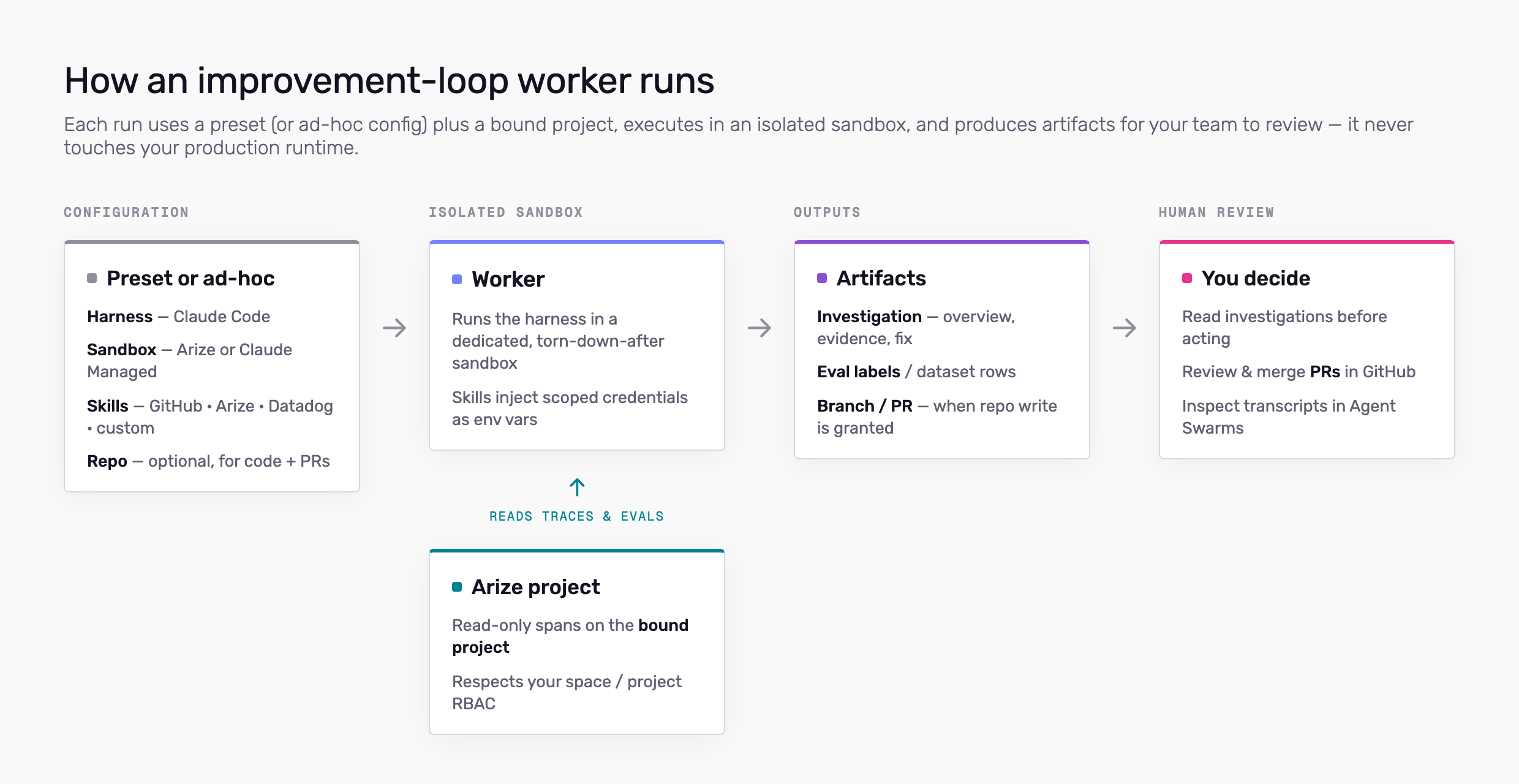
What a run uses
Harness — The agent runtime inside the sandbox. Claude Code is available today; Codex, Cursor, and other harnesses are on the roadmap. Defined on the preset or chosen ad hoc in Studio. Sandbox — The compute environment. Arize runs on Arize-managed Kubernetes—the worker clones a repo, installs dependencies, and loads skills there. Claude Managed Agent runs on Anthropic’s managed infrastructure (pick agent and environment on the preset). Automations require the Arize sandbox; Claude Managed Agent supports sessions only. Project — The LLM project whose traces and evals the worker may read for that run. Bound in Studio or on the Signal automation. Skills — Account-level integrations (GitHub, Arize, Datadog, custom skills) attached to the preset or added for a one-off session. Each skill injects credentials into the sandbox as environment variables. Configure them under More → Agent Skills. See Skills and permissions. Repo — Optional GitHub repository on the preset. Requires a GitHub skill. Used for code context and opening PRs.Session vs automation
Both use the same preset and sandbox model when a preset is selected.- Session — Started from Agent Studio. You can follow the transcript and send follow-ups. Preset optional (None for ad-hoc config).
- Automation — Same worker configuration on a cron or metric trigger. Requires a preset. Signal is a built-in automation on each LLM project.
What workers can access
| Source | Scope |
|---|---|
| Arize traces (default) | Read spans on the bound project—provisioned automatically at job start; no Arize skill required |
| Arize skill (optional) | Broader Arize API access (datasets, experiments, evaluators, etc.) per the ARIZE_API_KEY you attach |
| GitHub | Repos and tokens you configure on the GitHub skill; repo field on the preset when GitHub is enabled |
| Datadog | APIs allowed by keys on the Datadog skill |
| Custom skills | GitHub repos you list as the skill install source (clone into the sandbox) |
What workers cannot do
- Run as your customer-facing production agent — the improvement loop improves systems you observe in Arize; it does not replace your app’s runtime.
- Change production without review — Code changes go through PRs; you merge in GitHub.
- Access projects or spaces outside the binding you set on the run (or your RBAC, whichever is narrower).
Credentials and secrets
- Skill secrets (API keys, tokens) are stored encrypted at rest on the account and injected into the sandbox for the run.
- Starting a worker may create a short-lived service key for sandbox provisioning. Creating jobs requires appropriate space permissions; see Skills and permissions.
- Do not put secrets in task prompts. Configure them on the skill or preset.
Sandboxes and isolation
Each run gets a dedicated sandbox instance. When the run ends, the environment is torn down according to your sandbox provider settings. Agent execution is traced so you can audit tool use and outputs in Agent Swarms session detail (View traces). Treat sandbox workers like any privileged automation: scope repos and API keys to least privilege, rotate credentials on the skill definitions, and review PRs before merge.Human review
Design workflows assuming a person approves outcomes:- Read Signal investigations before acting.
- Review PRs in GitHub.
- Inspect job transcripts and artifacts in Agent Swarms.
Related docs
- Agent Presets — Save harness, sandbox, repo, and skills
- Skills and permissions — Configure skills and who can edit them
- Agent Studio — Start sessions and automations
- Arize Skills (local coding agents) — Different path: skills in Cursor or Claude Code on your machine