

SAML is available on AX Enterprise accounts.
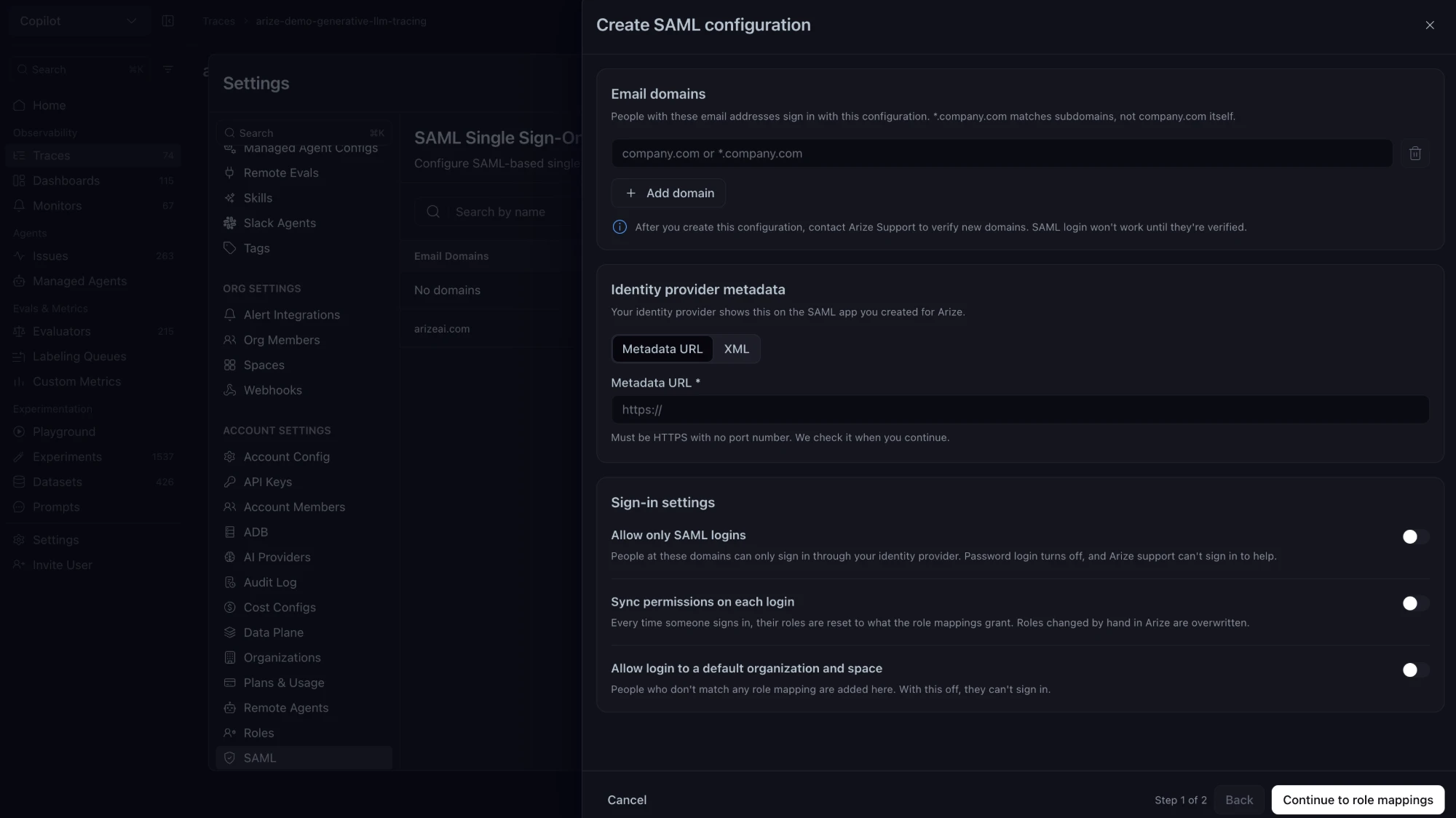
Connect your identity provider
SAML is configured under Settings → Account Settings → SAML.Configure your identity provider
In your identity provider, create a SAML 2.0 application for Arize AX. Use the service provider (SP) values for your Arize region:- United States
- European Union
- Canada
- Single sign-on URL:
https://app.arize.com/auth/v2/saml - Audience URI (SP Entity ID):
https://app.arize.com - Arize service provider metadata:
https://app.arize.com/auth/v2/saml/metadata
urn:oasis:names:tc:SAML:1.1:nameid-format:emailAddress and use the user’s email address as its value. For the full name, Arize reads the Name, displayName, or http://schemas.xmlsoap.org/ws/2005/05/identity/claims/name attribute.
- Add the email domains for this configuration, such as
company.comor*.company.com. - Enter the identity provider’s metadata URL or paste its XML. The URL must use HTTPS with no port number.
- Choose the sign-in settings and continue to role mappings.
Sign-in settings
- Allow only SAML logins turns off password login for these domains. Arize Support cannot sign in to help. Make sure at least one administrator can sign in through the identity provider before turning this on. While it is on,
POST /v2/usersinvitations return400. - Sync permissions on each login resets each user’s roles to the role mappings at every sign-in. Roles changed by hand in Arize are overwritten.
- Allow login to a default organization and space lets users with no matching role mapping sign in. They join the default organization and space. Without this setting, those users cannot sign in.
Map roles
A role mapping assigns Arize roles to users whose SAML attributes match, such asdepartment equal to engineering.
A mapping matches on one or more attribute names and values. All pairs must match the assertion. The mapping sets:
- Account Admin, which grants Account Admin access. A wrong admin mapping can lock people out, including you. Check it before signing out.
- Account role: Account Member or Account Member - UI Only.
- Organization and Organization role.
- Space and Space role, including custom roles. More spaces can be added.
- Project assignments inside a space assignment: Viewer, Editor, Admin, or a custom role on a restricted project in that space.