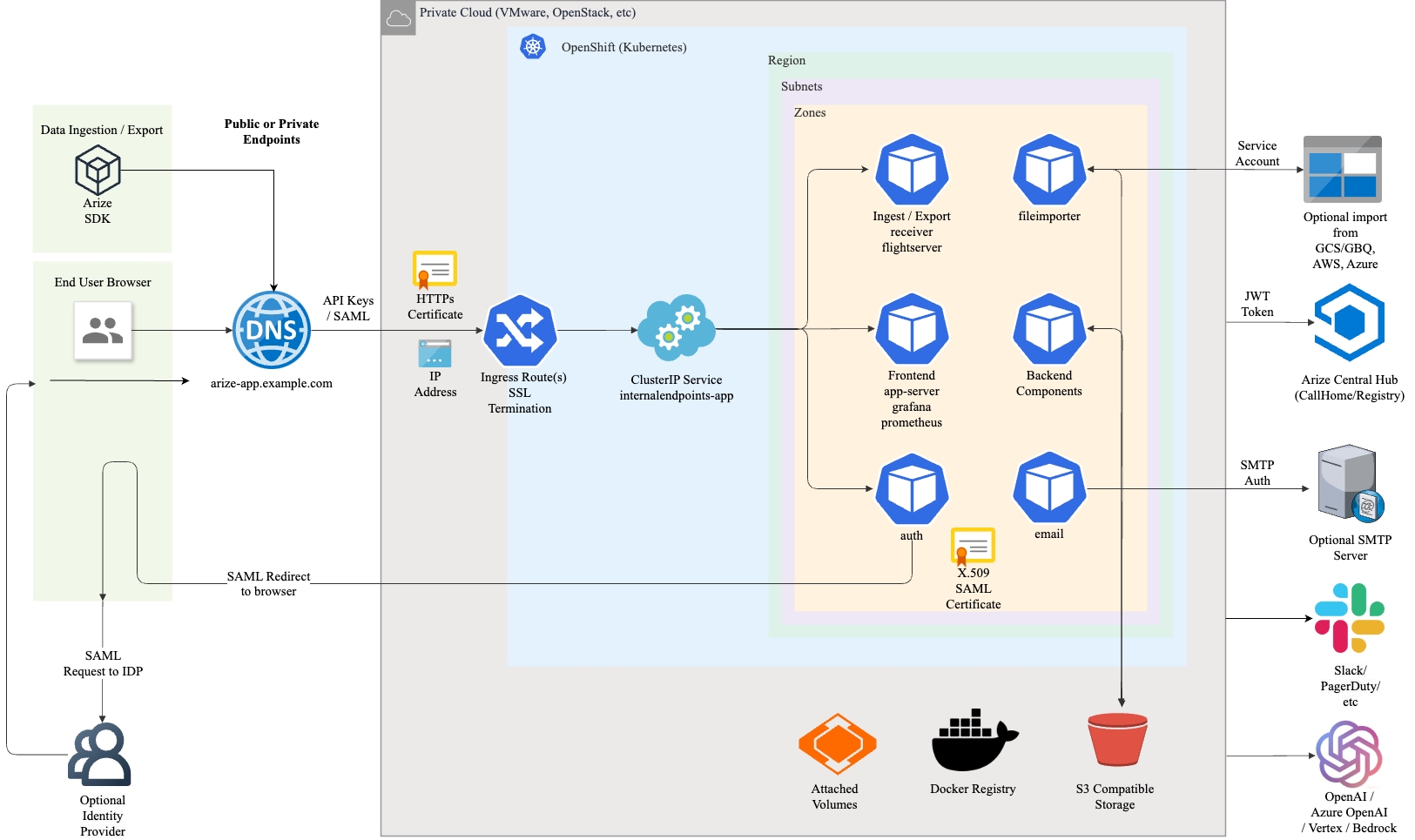
This section provides guidance for installing Arize on RedHat OpenShift, RedHat OpenShift on AWS (ROSA), etc. The diagram below depicts a typical deployment topology for OpenShift on Private Clouds.
Contact Arize for the <sizing option> field. This field controls the size of the deployment and must align with the size of the cluster. Common values used would be small1b or medium2b.values.yaml:
Copy
Ask AI
cloud: "ceph"clusterName: "<cluster-name>"hubJwt: "<JWT>" (base64 encoded)gazetteBucket: "<name of gazette bucket>"druidBucket: "<name of druid bucket>"postgresPassword: "<user selected postgres password>" (base64 encoded)organizationName: "<name of the organization or company>"cipherKey: "<encryption key>" (base64 encoded)clusterSizing: "<sizing option>"cephS3Endpoint: "<URL to the Ceph S3 endpoint>"cephS3AccessKeyId: "<Ceph S3 access key id>" (base64 encoded)cephS3SecretAccessKey: "<Ceph S3 secret access key>" (base64 encoded)collectNodeMetrics: true# The URL used to reach the Arize UI once ingress endpoints are createdappBaseUrl: "https://<arize-app.domain>"# Only required if using a private docker registrypushRegistry: "<docker-registry>"pullRegistry: "<docker-registry>"# Only required if using a common node poolhistoricalNodePoolEnabled: false# Change to align with namespacesbaseRunAsUser: 1000baseRunAsGroup: 1000baseFsGroup: 1000sparkRunAsUser: 1000sparkRunAsGroup: 1000sparkFsGroup: 1000postgresRunAsUser: 70postgresRunAsGroup: 70postgresFsGroup: 70operatorRunAsUser:1000operatorRunAsGroup: 1000operatorFsGroup: 1000ingressMode: 'openshift'
Choose an approach based on the deployment, for helm: