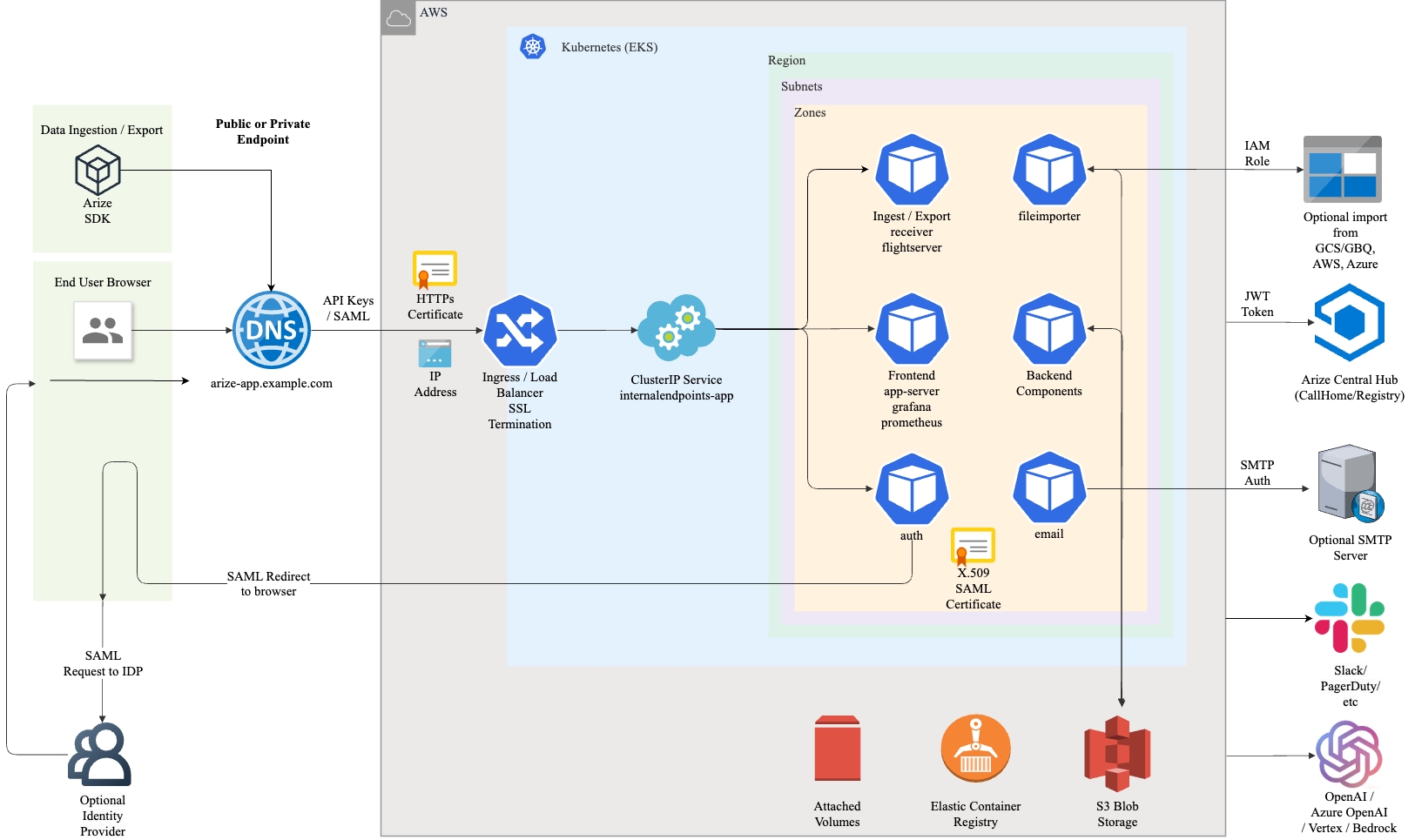
The diagram below depicts the target topology for AWS.
Requirements for AWS:
  • Two S3 storage buckets for gazette and druid data.
  • Buckets can be configured to use AES256, KMS, or no encryption.
  • An EKS cluster with a minimum of two node pools: base pool and druid pool.
  • The base node pool should be labeled with arize=true and arize-base=true.
  • The druid node pool should be labeled with arize=true and druid-historical=true.
  • Storage classes gp2 is preferred and used by default.
  • An ECR or docker registry is optional as Arize pulls images from Arize AX’s central image registry by default.
  • Namespaces arize, arize-operator, and arize-spark can be pre-existing or created later by the helm chart.
  • If deployed on a private VPC, these endpoints must be accessible from the cluster:
    • com.amazonaws..s3
    • com.amazonaws..ecr.api
    • com.amazonaws..ecr.dkr
    • com.amazonaws..ec2
    • com.amazonaws..elasticloadbalancing
    • com.amazonaws..sts
    • com.amazonaws..ebs
  • An IAM role with the following policy actions on the Arize druid and gazette buckets:
    • s3:ListBucket
    • s3:*Object
    • kms:Encrypt
    • kms:Decrypt
    • kms:ReEncrypt*
    • kms:GenerateDataKey*
    • kms:DescribeKey
    • bedrock:InvokeModel
  • If using IAM roles for service accounts (IRSA):
    • The roles must have a trust policy that allows these service accounts to assume the role:
      • system:serviceaccount:arize:*
      • system:serviceaccount:arize-spark:*
      • system:serviceaccount:arize-operator:*
  • If not using IAM roles for service accounts (IRSA):
    • The policy actions should be added to the role attached to the nodes.
    • Pods should be able to discover the node role through instance metadata.
Contact Arize for the <sizing option> field. This field controls the size of the deployment and must align with the size of the cluster. Common values used would be small1b or medium2b. values.yaml:
cloud: "aws"
clusterName: "arn:aws:eks:<region>:<account-id>:cluster/<cluster-name>"
hubJwt: "<JWT>" (base64 encoded)
gazetteBucket: "<name of gazette bucket>"
druidBucket: "<name of druid bucket>"
postgresPassword: "<user selected postgres password>" (base64 encoded)
organizationName: "<name of the organization or company>"
cipherKey: "<encryption key>" (base64 encoded)
clusterSizing: "<sizing option>"
region: "<region>"
serverSideEncryption: ""
collectNodeMetrics: true

# The URL used to reach the Arize UI once ingress endpoints are created
appBaseUrl: "https://<arize-app.domain>"

# Omit this field if using node level roles instead of IAM roles for service accounts (IRSA)
awsServiceAccountRoleRwBucket: "arn:aws:iam::<account-id>:role/<read-write-role>"

# Only required if using a private docker registry
pushRegistry: "<account-id>.dkr.ecr.<region>.amazonaws.com"
pullRegistry: "<account-id>.dkr.ecr.<region>.amazonaws.com"

# Only required if using a common node pool
historicalNodePoolEnabled: false
Choose an approach based on the deployment. For helm:
$ helm upgrade --install -f values.yaml arize-op arize-operator-chart.tgz