

Retrieval Evaluation Colab Tutorial
How Search and Retrieval Works
Here’s an example of what retrieval looks like for a Chatbot Application. A user asked a specific question, an embedding was generated from the query, and all relevant context in the knowledge base was pulled and added into the prompt to the LLM.
Common Problems with Search and Retrieval Systems
When the application using RAG doesn’t give a good response, it can be because of different reasons. The common issues we see are- There weren’t enough documents to answer the question
- The document retrieved wasn’t good enough to answer

Logging data to Arize for Search and Retrieval Tracing
Arize logs both a sample of the knowledge base and the production prompt/response pairs of the deployed application. Here’s a high-level view of what is logged:
Step 1: Logging a Corpus Dataset (Knowledge Base)
The first thing we need is to collect documents from your vector store, to be able to compare against later. This is to be able to see if some sections are not being retrieved, or some sections are getting a lot of traffic where you might want to beef up your context or documents in that area.Example of Corpus Dataframe (Knowledge Base)
| document_id | text | text_vector |
|---|---|---|
123 | The Variety Theater in Cleveland, once a ... | [-0.0051908623, -0.05508642, -0.28958365, -0.2... |
Step 2: Logging Production Prompt/Responses to Arize
We also will be logging the prompt/response pairs from the deployed application. Example Dataframe: prompts-response.df| prediction-ID | user-query | query-vector | document | document-vector | response | response vector | user feedback |
|---|---|---|---|---|---|---|---|
dd824bd3-2097… | What is the Variety Theater in Cleveland? | [-0.5686951, -0.7092256, -0.34603243, -0.4858… | The Variety Theater in Cleveland, once a … | [-0.1869151, -0.2092136, -0.1660343, -0.3258… | The Variety Theater is … | [-0.18691051, -0.2092136, -0.16603243, -0.3258… | thumbs-down |
Tracing Search and Retrieval Systems with Arize
Issue #1: Bad Response
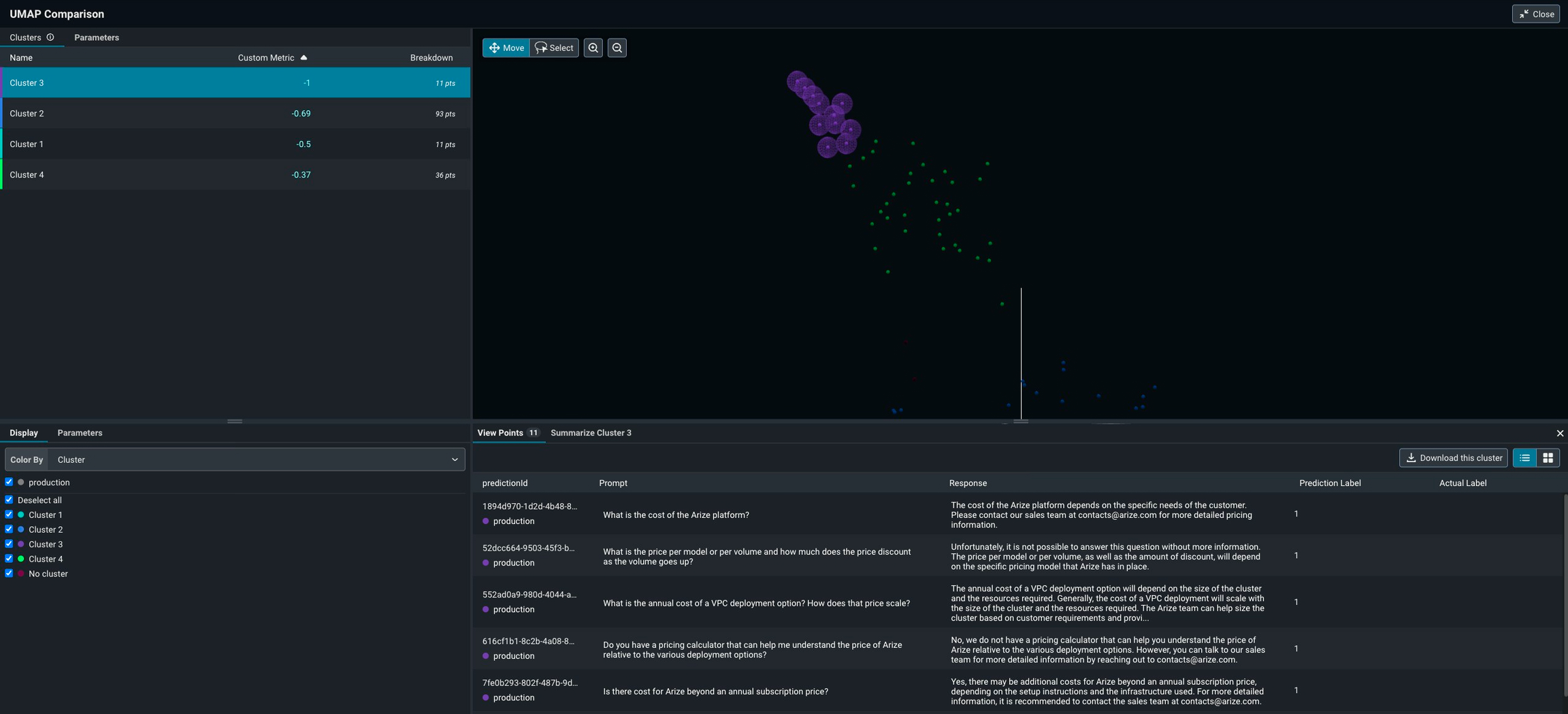
The first issue we see, and often the easiest to uncover, is bad responses. Navigate to the Embeddings projctor tab to debug your search and retrieval. If you have logged performance metrics (like user feedback or eval scores on the LLM response), we will automatically surface up any clusters that received poor feedback.Note: you may need to create a custom metric based on an eval tag to surface up

Issue #2: Don’t Have Any Documents Close Enough
Maybe, the retriever wasn’t able to find any documents that were close enough to the query embedding. This means that users are asking questions about context that is missing from your corpus. Arize can help you identify if there is context that is missing from your corpus. By visualizing query density, you can understand what topics you need to add additional documentation for in order to improve your chatbot responses.


Issue #3: Most Similar != Most Relevant Document
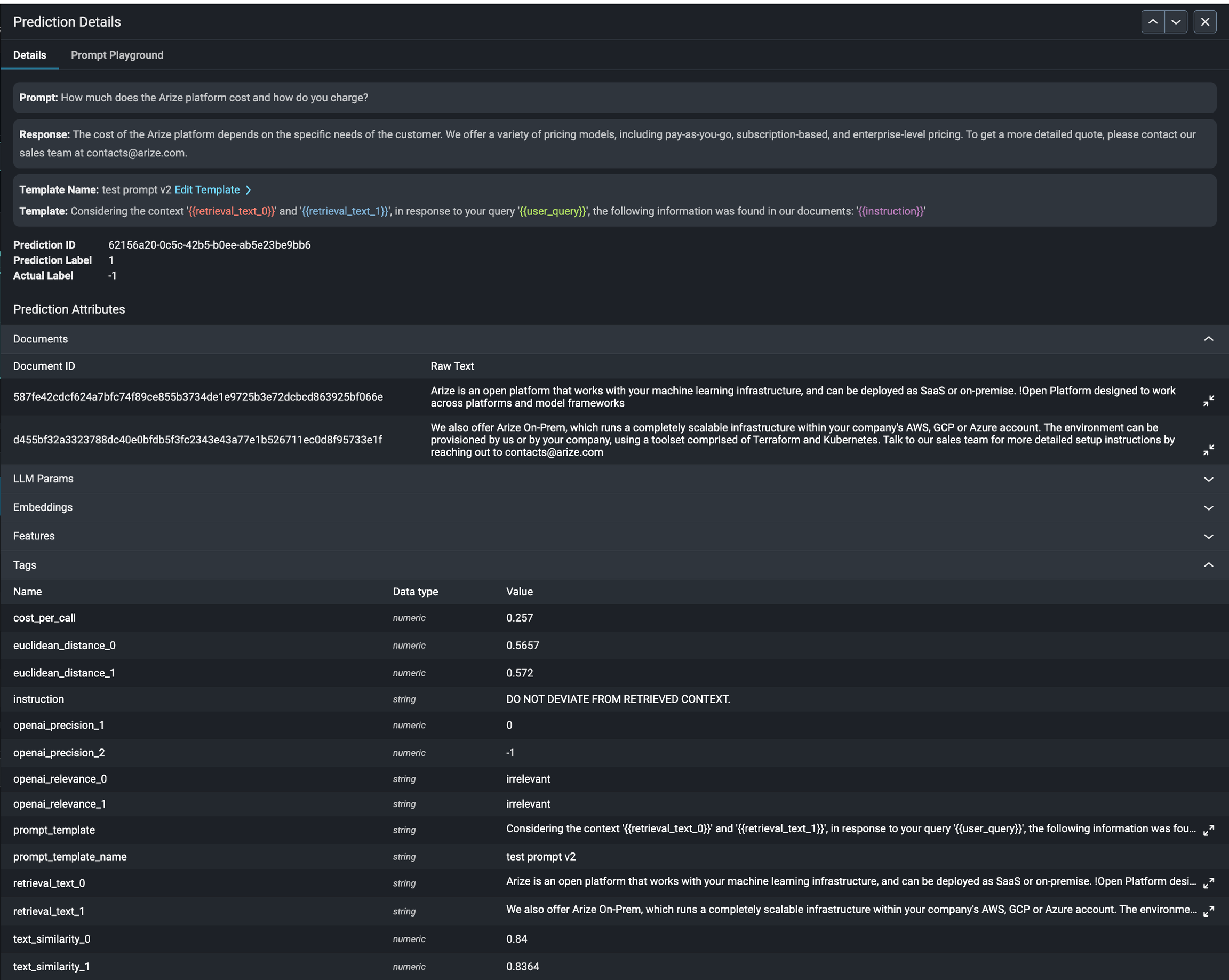
There is also the possibility that the document that was retrieved was considered most similar, and had the closest embedding to the query, but wasn’t actually the most relevant document to answer the user’s question appropriately. Arize can help uncover when irrelevant context is retrieved with LLM-assisted ranking metrics. By ranking the relevance of the context retrieved, we can help you identify areas to dig into to improve the retrieval.
Troubleshooting Tip:Found a problematic cluster you want to dig into, but don’t want to manually sift through all of the prompts and responses? Use our Open AI Cluster Summarization tool to quickly get a summary of the selected cluster for quick analysis.
