"""
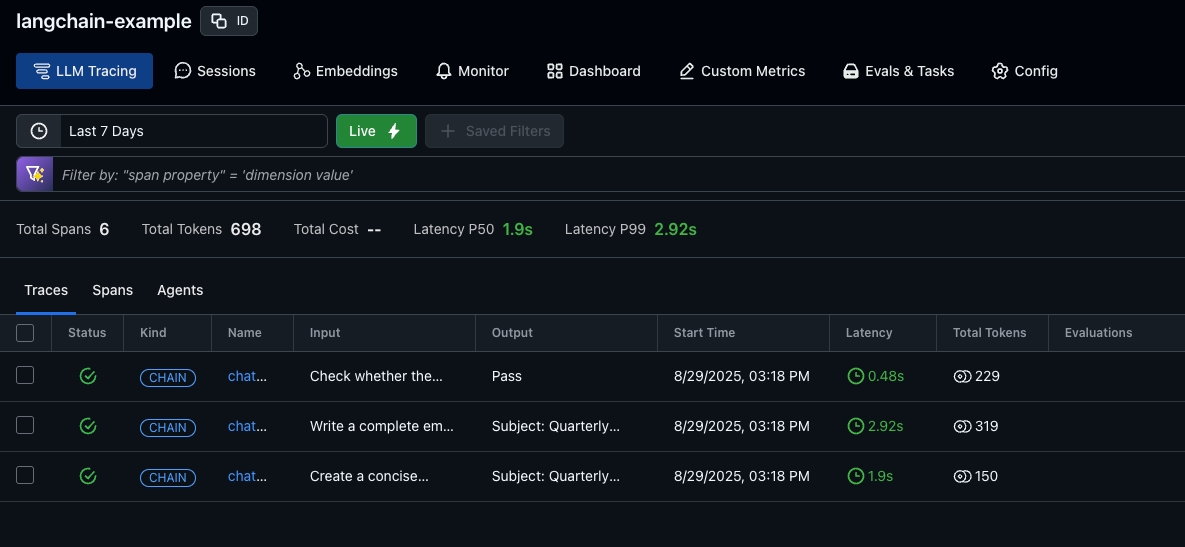
Email Composer Agent with Observability

This script defines a LangGraph-based multi-step agent that generates,
formats, and tones email drafts based on bullet points and a desired tone.
It includes OpenLIT instrumentation and OpenLIT → OpenInference trace conversion
for real-time tracing and observability in or Arize.
"""

import json
import os
import sys

import grpc
import openlit
from langchain.chat_models import ChatOpenAI
from langgraph.graph import END, START, StateGraph
from opentelemetry.exporter.otlp.proto.grpc.trace_exporter import OTLPSpanExporter
from opentelemetry.sdk.trace import SpanProcessor
from opentelemetry.sdk.trace.export import BatchSpanProcessor
from arize.otel import register
from typing_extensions import Literal, TypedDict

from openinference.instrumentation.openlit import OpenInferenceSpanProcessor

# --------------------------------------------------------------------------------
# Setup OpenTelemetry Tracing
# --------------------------------------------------------------------------------

API_KEY = os.getenv("ARIZE_API_KEY")
SPACE_ID = os.getenv("ARIZE_SPACE_ID")

provider = register(
    space_id=SPACE_ID,
    api_key=API_KEY,
    project_name=os.environ.get("ARIZE_PROJECT_NAME", "langchain-openlit"),
    set_global_tracer_provider=True,
)

provider.add_span_processor(OpenInferenceSpanProcessor())

provider.add_span_processor(
    BatchSpanProcessor(
        OTLPSpanExporter(
            endpoint="otlp.arize.com:443",
            headers={
                "authorization": f"Bearer {API_KEY}",
                "arize-space-id": SPACE_ID,
                "arize-interface": "python",
                "user-agent": "arize-python",
            },
            compression=grpc.Compression.Gzip,
        )
    )
)

tracer = provider.get_tracer(__name__)
openlit.init(tracer=tracer)

# --------------------------------------------------------------------------------
# LLM Setup
# --------------------------------------------------------------------------------

os.environ["OPENAI_API_KEY"] = os.getenv("OPENAI_API_KEY")
llm = ChatOpenAI(model="gpt-5.4-mini")

# --------------------------------------------------------------------------------
# State Definition
# --------------------------------------------------------------------------------

class EmailState(TypedDict, total=False):
    subject: str
    bullet_points: str
    desired_tone: str  # e.g., "formal", "friendly"
    outline: str
    draft_email: str
    final_email: str

# --------------------------------------------------------------------------------
# Node Functions
# --------------------------------------------------------------------------------

def generate_outline(state: EmailState) -> EmailState:
    """Node 1: Generate outline from bullet points."""
    prompt = (
        "Create a concise outline for an email.\n"
        f"Subject: {state['subject']}\n"
        f"Bullet points:\n{state['bullet_points']}\n"
        "Return the outline as numbered points."
    )
    outline = llm.invoke(prompt).content
    return {"outline": outline}

def write_email(state: EmailState) -> EmailState:
    """Node 2: Write email based on the outline and tone."""
    prompt = (
        f"Write a complete email using this outline:\n{state['outline']}\n\n"
        f"Tone: {state['desired_tone']}\n"
        "Start with a greeting, use professional formatting, and keep it concise."
    )
    email = llm.invoke(prompt).content
    return {"draft_email": email}

def tone_gate(state: EmailState) -> Literal["Pass", "Fail"]:
    """Heuristic: Does email match the desired tone?"""
    prompt = (
        f"Check whether the following email matches the desired tone {state['desired_tone']}:\n\n"
        f"{state['draft_email']}\n\n"
        "If it does, return 'Pass'. Otherwise, return 'Fail'."
    )
    return llm.invoke(prompt).content.strip()

def reform_tone(state: EmailState) -> EmailState:
    """Node 3: Rewrite the email to match the desired tone."""
    prompt = (
        f"Reform the following email to match a {state['desired_tone']} tone:\n\n"
        f"{state['draft_email']}\n\n"
        "Keep the content unchanged, but adjust phrasing, tone, and sign-off."
    )
    final_email = llm.invoke(prompt).content
    return {"final_email": final_email}

# --------------------------------------------------------------------------------
# Build LangGraph Workflow
# --------------------------------------------------------------------------------

graph = StateGraph(EmailState)

graph.add_node("outline_generator", generate_outline)
graph.add_node("email_writer", write_email)
graph.add_node("tone_reformer", reform_tone)

graph.add_edge(START, "outline_generator")
graph.add_edge("outline_generator", "email_writer")
graph.add_conditional_edges("email_writer", tone_gate, {"Pass": END, "Fail": "tone_reformer"})
graph.add_edge("tone_reformer", END)

email_chain = graph.compile()

# --------------------------------------------------------------------------------
# Run Example
# --------------------------------------------------------------------------------

if __name__ == "__main__":
    input_state = {
        "subject": "Quarterly Sales Recap & Next Steps",
        "bullet_points": (
            "- Q1 revenue up 18%\n- Need feedback on new pricing tiers\n"
            "- Reminder: submit pipeline forecasts by Friday"
        ),
        "desired_tone": "friendly",
    }

    result = email_chain.invoke(input_state)
    output = result.get("final_email", result.get("draft_email"))

    print("\n========== FINAL EMAIL ==========")
    print(output)