> ## Documentation Index
> Fetch the complete documentation index at: https://arize-ax.mintlify.site/docs/llms.txt
> Use this file to discover all available pages before exploring further.
# Projects
## What is a Project?
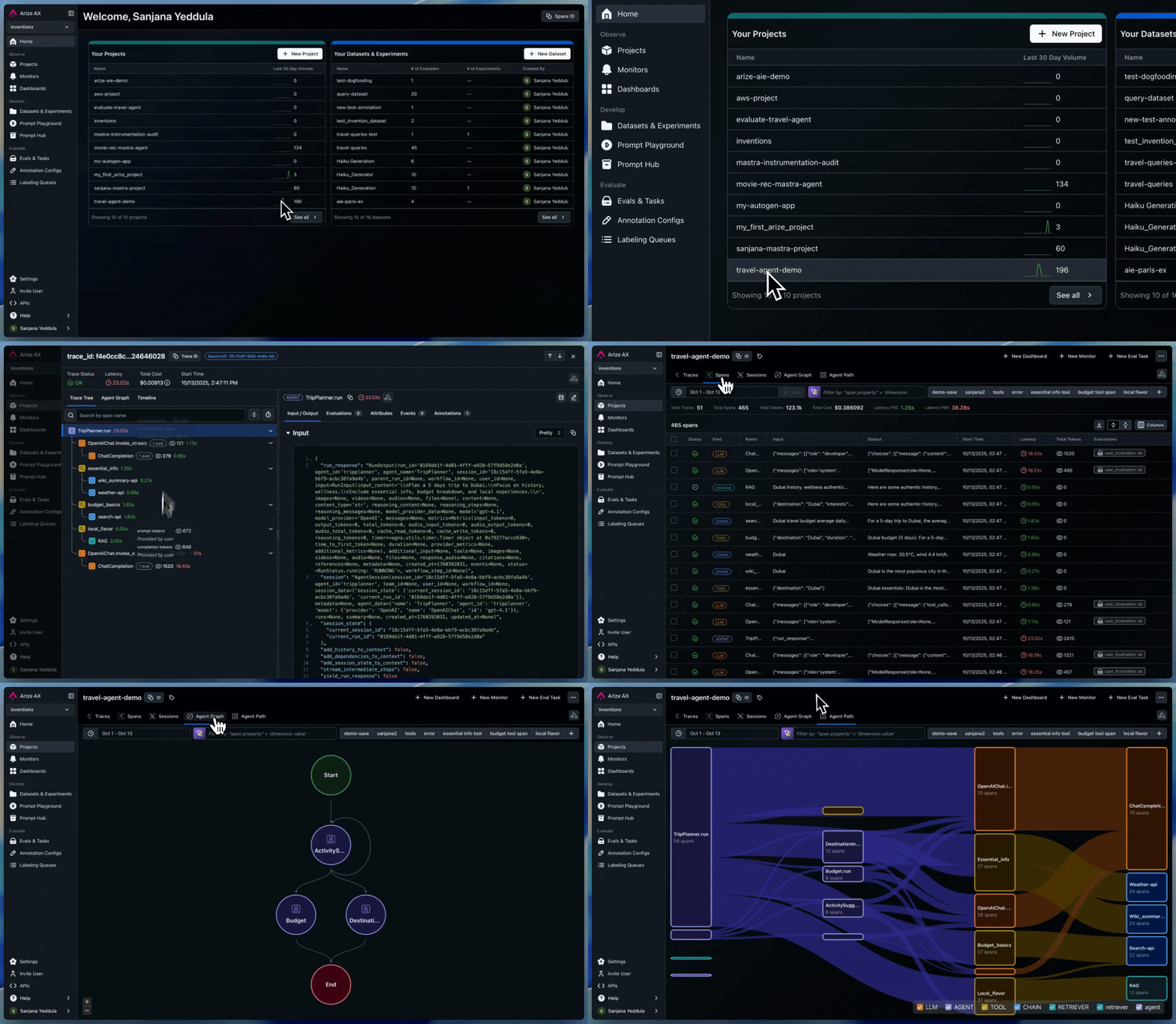
A **Project** is a dedicated workspace that keeps all related traces, evaluations, and sessions neatly organized in one place. In Arize, a **Space** can hold multiple projects**.**
 ## Why are Projects Important?
Projects provide an organized way to structure your work. They help you:
* **Isolate use cases:** Create dedicated spaces for each product or model to ensure traces and evals stays independent.
* **Create Dedicated Evals**: Build and re-use evaluations specific to your project to assess performance of your spans, traces, and sessions.
* **Visualize Agent Graphs and Paths**: Explore detailed agent graphs and execution paths within each project making it easier to understand how your agents reason and where bottlenecks occur.
## **Send Traces to a Project**
The code below shows how to setup tracing to export spans to a **Project**. To see how to use our auto instrumentations see [Integrations](/docs/ax/observe/tracing/setup/integrations).
```python theme={"theme":{"light":"github-light-default","dark":"github-dark-default"}}
# Import open-telemetry dependencies
from arize.otel import register
# Setup OTel via our convenience function
tracer_provider = register(
space_id = "your-space-id", # in app space settings page
api_key = "your-api-key", # in app space settings page
project_name = "your-project-name", # name this to whatever you would like
)
```
1. Install dependencies:
```bash theme={"theme":{"light":"github-light-default","dark":"github-dark-default"}}
npm install @opentelemetry/exporter-trace-otlp-grpc @grpc/grpc-js @opentelemetry/sdk-trace-base @opentelemetry/sdk-trace-node @opentelemetry/reources @opentelemetry/api
```
2. Create an `instrumentation.ts` file. That file should look like this:
```typescript theme={"theme":{"light":"github-light-default","dark":"github-dark-default"}}
import { registerInstrumentations } from "@opentelemetry/instrumentation";
import { ConsoleSpanExporter } from "@opentelemetry/sdk-trace-base";
import {
NodeTracerProvider,
SimpleSpanProcessor,
} from "@opentelemetry/sdk-trace-node";
import { Resource } from "@opentelemetry/resources";
import {
OTLPTraceExporter as GrpcOTLPTraceExporter
} from "@opentelemetry/exporter-trace-otlp-grpc"; // Arize specific
import { diag, DiagConsoleLogger, DiagLogLevel } from "@opentelemetry/api";
import { Metadata } from "@grpc/grpc-js"
// For troubleshooting, set the log level to DiagLogLevel.DEBUG
diag.setLogger(new DiagConsoleLogger(), DiagLogLevel.DEBUG);
// Arize specific - Create metadata and add your headers
const metadata = new Metadata();
// Your Arize Space and API Keys, which can be found in the UI, see below
metadata.set('arize-space-id', 'your-space-id');
metadata.set('arize-api-key', 'your-api-key');
const provider = new NodeTracerProvider({
resource: new Resource({
// Arize specific - The name of a new or preexisting model you
// want to export spans to
"model_id": "your-model-id",
"model_version": "your-model-version"
}),
});
provider.addSpanProcessor(new SimpleSpanProcessor(new ConsoleSpanExporter()));
provider.addSpanProcessor(
new SimpleSpanProcessor(
new GrpcOTLPTraceExporter({
url: "https://otlp.arize.com/v1",
metadata,
}),
),
);
// Add auto instrumentatons here
provider.register();
```
3. This file needs to run at the entry point of your application, before any other code on your server runs. You can do this by importing it at the top of your entry point for example in something like `server/app.ts`:
```typescript theme={"theme":{"light":"github-light-default","dark":"github-dark-default"}}
import "./instrumentation"
// server startup
```
Or you can import it via a node command when you run your server as outline in the [OpenTelemetry documentation](https://opentelemetry.io/docs/languages/js/instrumentation/#initialize-the-sdk) using import or require:
```bash theme={"theme":{"light":"github-light-default","dark":"github-dark-default"}}
# require
npx ts-node --require ./instrumentation.ts app.ts
# import
npx ts-node --import ./instrumentation.ts app.ts
# Or without ts-node something like
node --import ./dist/instrumentation.cjs ./dist/index.cjs
```
## Why are Projects Important?
Projects provide an organized way to structure your work. They help you:
* **Isolate use cases:** Create dedicated spaces for each product or model to ensure traces and evals stays independent.
* **Create Dedicated Evals**: Build and re-use evaluations specific to your project to assess performance of your spans, traces, and sessions.
* **Visualize Agent Graphs and Paths**: Explore detailed agent graphs and execution paths within each project making it easier to understand how your agents reason and where bottlenecks occur.
## **Send Traces to a Project**
The code below shows how to setup tracing to export spans to a **Project**. To see how to use our auto instrumentations see [Integrations](/docs/ax/observe/tracing/setup/integrations).
```python theme={"theme":{"light":"github-light-default","dark":"github-dark-default"}}
# Import open-telemetry dependencies
from arize.otel import register
# Setup OTel via our convenience function
tracer_provider = register(
space_id = "your-space-id", # in app space settings page
api_key = "your-api-key", # in app space settings page
project_name = "your-project-name", # name this to whatever you would like
)
```
1. Install dependencies:
```bash theme={"theme":{"light":"github-light-default","dark":"github-dark-default"}}
npm install @opentelemetry/exporter-trace-otlp-grpc @grpc/grpc-js @opentelemetry/sdk-trace-base @opentelemetry/sdk-trace-node @opentelemetry/reources @opentelemetry/api
```
2. Create an `instrumentation.ts` file. That file should look like this:
```typescript theme={"theme":{"light":"github-light-default","dark":"github-dark-default"}}
import { registerInstrumentations } from "@opentelemetry/instrumentation";
import { ConsoleSpanExporter } from "@opentelemetry/sdk-trace-base";
import {
NodeTracerProvider,
SimpleSpanProcessor,
} from "@opentelemetry/sdk-trace-node";
import { Resource } from "@opentelemetry/resources";
import {
OTLPTraceExporter as GrpcOTLPTraceExporter
} from "@opentelemetry/exporter-trace-otlp-grpc"; // Arize specific
import { diag, DiagConsoleLogger, DiagLogLevel } from "@opentelemetry/api";
import { Metadata } from "@grpc/grpc-js"
// For troubleshooting, set the log level to DiagLogLevel.DEBUG
diag.setLogger(new DiagConsoleLogger(), DiagLogLevel.DEBUG);
// Arize specific - Create metadata and add your headers
const metadata = new Metadata();
// Your Arize Space and API Keys, which can be found in the UI, see below
metadata.set('arize-space-id', 'your-space-id');
metadata.set('arize-api-key', 'your-api-key');
const provider = new NodeTracerProvider({
resource: new Resource({
// Arize specific - The name of a new or preexisting model you
// want to export spans to
"model_id": "your-model-id",
"model_version": "your-model-version"
}),
});
provider.addSpanProcessor(new SimpleSpanProcessor(new ConsoleSpanExporter()));
provider.addSpanProcessor(
new SimpleSpanProcessor(
new GrpcOTLPTraceExporter({
url: "https://otlp.arize.com/v1",
metadata,
}),
),
);
// Add auto instrumentatons here
provider.register();
```
3. This file needs to run at the entry point of your application, before any other code on your server runs. You can do this by importing it at the top of your entry point for example in something like `server/app.ts`:
```typescript theme={"theme":{"light":"github-light-default","dark":"github-dark-default"}}
import "./instrumentation"
// server startup
```
Or you can import it via a node command when you run your server as outline in the [OpenTelemetry documentation](https://opentelemetry.io/docs/languages/js/instrumentation/#initialize-the-sdk) using import or require:
```bash theme={"theme":{"light":"github-light-default","dark":"github-dark-default"}}
# require
npx ts-node --require ./instrumentation.ts app.ts
# import
npx ts-node --import ./instrumentation.ts app.ts
# Or without ts-node something like
node --import ./dist/instrumentation.cjs ./dist/index.cjs
```