> ## Documentation Index
> Fetch the complete documentation index at: https://arize-ax.mintlify.site/docs/llms.txt
> Use this file to discover all available pages before exploring further.

# Tracking Token Usage

> Use token counts to find problematic traces, long running conversations or investigate prompt variable or context overflow

export const AskAlyx = ({children}) => {
  const gradientId = `askAlyxGradient-${Math.random().toString(36).slice(2)}`;
  return <div style={{
    display: "flex",
    alignItems: "flex-start",
    gap: "0.625rem",
    margin: "1rem 0",
    padding: "0.75rem 1rem",
    borderRadius: "10px",
    border: "1px solid rgba(120, 115, 245, 0.25)",
    background: "linear-gradient(135deg, rgba(255, 110, 196, 0.08), rgba(120, 115, 245, 0.08))"
  }}>
      <svg width="18" height="18" viewBox="0 0 21 17" xmlns="http://www.w3.org/2000/svg" style={{
    flexShrink: 0,
    marginTop: "0.2rem"
  }}>
        <defs>
          <linearGradient id={gradientId} x1="0%" y1="100%" x2="100%" y2="0%">
            <stop offset="0%" stopColor="#FF3CA8" />
            <stop offset="100%" stopColor="#4827C1" />
          </linearGradient>
        </defs>
        <path d="M6.28906 12.7223C6.28889 11.3831 5.24007 10.3385 3.98926 10.3385C2.73859 10.3387 1.68963 11.3832 1.68945 12.7223C1.68945 14.0616 2.73849 15.1059 3.98926 15.1061C5.24018 15.1061 6.28906 14.0617 6.28906 12.7223ZM7.81152 0.557254C9.70554 -0.563135 12.1081 0.0645388 13.2607 1.91468L13.3691 2.09827V2.09925L20.7266 15.402C20.8713 15.6637 20.8667 15.9823 20.7148 16.2399C20.5629 16.4975 20.2864 16.6559 19.9873 16.6559H14.5459C13.0953 16.6474 11.7648 15.848 11.0469 14.5748V14.5739L6.33301 6.19104C5.22656 4.2273 5.87813 1.706 7.80957 0.558231L7.81152 0.557254ZM11.8906 2.91761C11.2374 1.74047 9.78961 1.34962 8.67188 2.01038L8.67285 2.01136C7.61521 2.64 7.19477 3.99924 7.69336 5.13733L7.80566 5.36194V5.36292L12.5186 13.7448C12.9466 14.5038 13.7274 14.9616 14.5557 14.9664H18.5547L11.8906 2.91663V2.91761ZM7.97949 12.7223C7.97949 14.9527 6.21527 16.7965 3.98926 16.7965C1.7634 16.7963 0 14.9526 0 12.7223C0.000173728 10.4921 1.76351 8.64923 3.98926 8.64905C6.21516 8.64905 7.97932 10.492 7.97949 12.7223Z" fill={`url(#${gradientId})`} />
      </svg>
      <span>{children}</span>
    </div>;
};

<Frame>
  <iframe width="100%" height="400" src="https://www.youtube.com/embed/mpifjVPXPdE" frameborder="0" allow="clipboard-write; picture-in-picture; web-share" allowfullscreen />
</Frame>

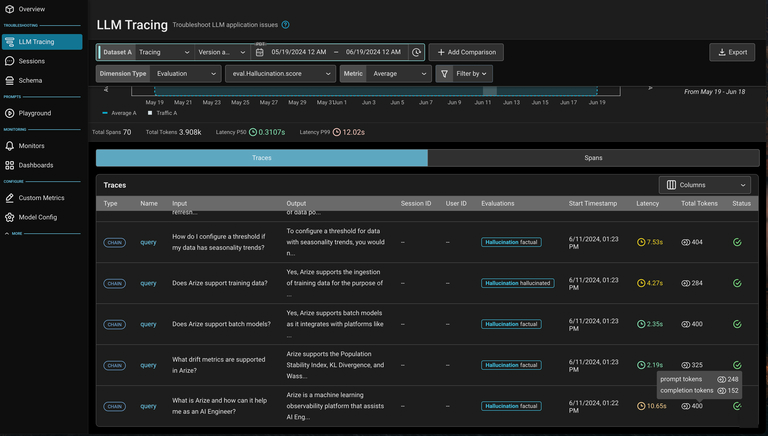
Arize ensures that LLM spans in the platform will contain token count values. We use the logic below to compute input and completion token counts per LLM span, and aggregate the counts up to the trace level.

A few useful flows for token counts include:

* Investigating/sorting traces or sessions by token count to find long running traces or sessions
* Monitoring or setting custom metrics (i.e. for cost) on token count
* *(soon)* Monitoring and debugging prompt variables using token counts

<AskAlyx>**Ask Alyx** to compute your token usage -- try *"What's the average token count per trace this week?"*</AskAlyx>

<Frame>
  <img src="https://storage.googleapis.com/arize-phoenix-assets/assets/images/arize-docs-images/token-counting-1.avif" alt="Token count calculation states" />
</Frame>

In the platform, the 3 possible states for token count calculations are shown below.

<Frame>
  <img src="https://storage.googleapis.com/arize-phoenix-assets/assets/images/arize-docs-images/token-counting-2.avif" alt="Token count calculation states in platform" />
</Frame>

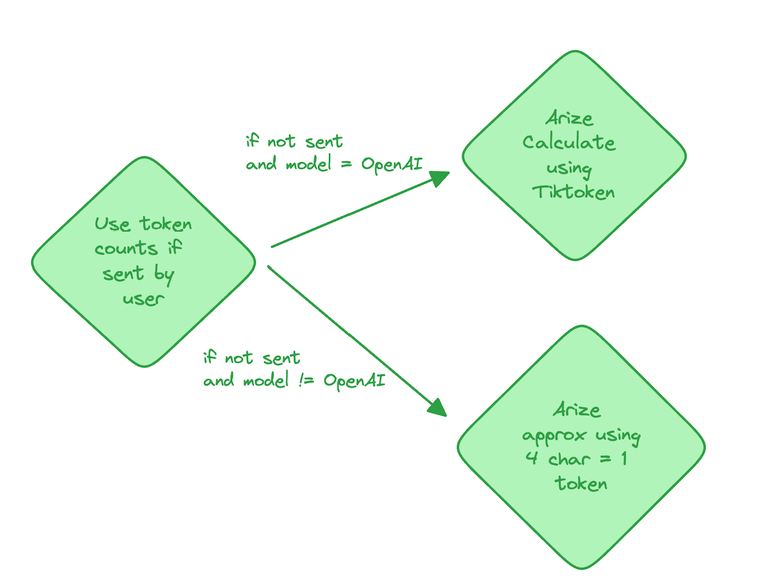
In the platform, you can see token counts aggregated in the tracing table below. Click into a trace to view token counts at the span level.
<Frame>
  <img src="https://storage.googleapis.com/arize-phoenix-assets/assets/images/arize-docs-images/token-counting-3.avif" alt="Token counts in tracing table" />
</Frame>