> ## Documentation Index
> Fetch the complete documentation index at: https://arize-ax.mintlify.site/docs/llms.txt
> Use this file to discover all available pages before exploring further.
# How Agents Work
> Sandboxes, presets, data access, outputs, and security boundaries for AX Agent Improvement Loop workers.
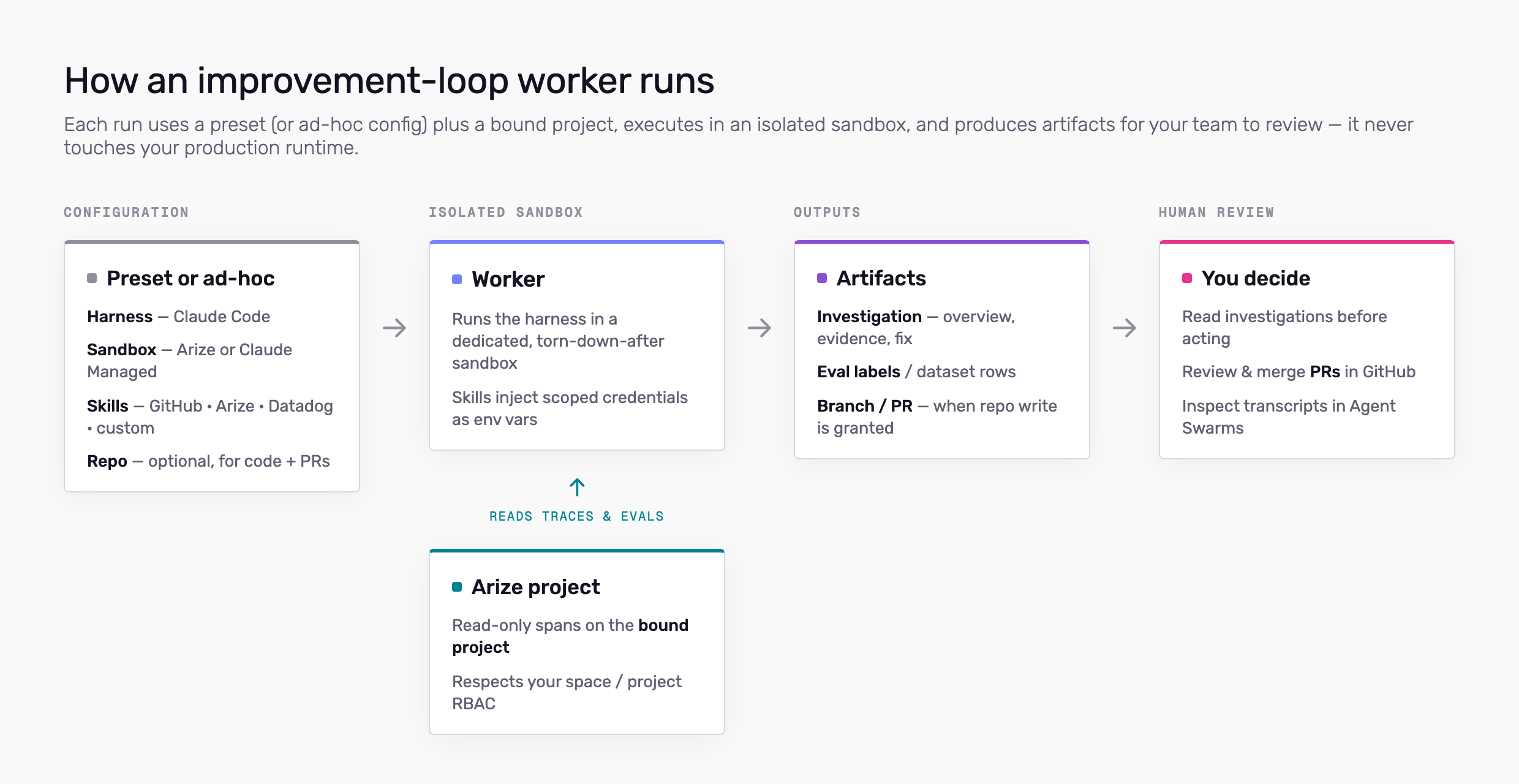
AX Agent Improvement Loop runs **workers** in isolated **sandboxes**. Each run uses an **agent preset** (or an ad-hoc configuration when you pick **None** in Studio) plus a **project** for trace and eval context.
Workers read telemetry from Arize and optionally call external tools through **skills**. They write **artifacts**—investigation files, eval output, branches, or PRs—for your team to review. Workers do not deploy to your production environment on their own.
 ## What a run uses
**Harness** — The agent runtime inside the sandbox. **Claude Code** is available today; Codex, Cursor, and other harnesses are on the roadmap. Defined on the preset or chosen ad hoc in Studio.
**Sandbox** — The compute environment. **Arize** runs on Arize-managed Kubernetes—the worker clones a repo, installs dependencies, and loads skills there. **Claude Managed Agent** runs on Anthropic's managed infrastructure (pick agent and environment on the preset). Automations require the Arize sandbox; Claude Managed Agent supports sessions only.
**Project** — The LLM project whose traces and evals the worker may read for that run. Bound in Studio or on the Signal automation.
**Skills** — Account-level integrations (GitHub, Arize, Datadog, custom skills) attached to the preset or added for a one-off session. Each skill injects credentials into the sandbox as environment variables. Configure them under **More → Agent Skills**. See [Skills and permissions](/ax/agents/skills-and-permissions).
**Repo** — Optional GitHub repository on the preset. Requires a **GitHub** skill. Used for code context and opening PRs.
## Session vs automation
Both use the same preset and sandbox model when a preset is selected.
* **Session** — Started from [Agent Studio](/ax/agents/agent-studio). You can follow the transcript and send follow-ups. Preset optional (**None** for ad-hoc config).
* **Automation** — Same worker configuration on a **cron** or **metric** trigger. **Requires a preset.** [Signal](/ax/agents/get-started-with-signal) is a built-in automation on each LLM project.
Manage all runs from [Agent Swarms](/ax/agents/manage-agents).
## What workers can access
| Source | Scope |
| -------------------------- | ------------------------------------------------------------------------------------------------------- |
| **Arize traces (default)** | **Read** spans on the bound **project**—provisioned automatically at job start; no Arize skill required |
| **Arize skill (optional)** | Broader Arize API access (datasets, experiments, evaluators, etc.) per the `ARIZE_API_KEY` you attach |
| **GitHub** | Repos and tokens you configure on the **GitHub** skill; repo field on the preset when GitHub is enabled |
| **Datadog** | APIs allowed by keys on the **Datadog** skill |
| **Custom skills** | GitHub repos you list as the skill install source (clone into the sandbox) |
Default trace access respects **project binding** and the user's **space/project RBAC**. An attached Arize skill adds whatever permissions that API key has—it does not bypass RBAC beyond what the key allows.
## What workers cannot do
* Run as your **customer-facing production agent** — the improvement loop improves systems you observe in Arize; it does not replace your app's runtime.
* Change production without review — Code changes go through **PRs**; you merge in GitHub.
* Access projects or spaces outside the binding you set on the run (or your RBAC, whichever is narrower).
## Credentials and secrets
* Skill secrets (API keys, tokens) are stored **encrypted at rest** on the account and injected into the sandbox for the run.
* Starting a worker may create a **short-lived service key** for sandbox provisioning. Creating jobs requires appropriate space permissions; see [Skills and permissions](/ax/agents/skills-and-permissions).
* Do not put secrets in task prompts. Configure them on the skill or preset.
## Sandboxes and isolation
Each run gets a dedicated sandbox instance. When the run ends, the environment is torn down according to your sandbox provider settings. Agent execution is **traced** so you can audit tool use and outputs in [Agent Swarms](/ax/agents/manage-agents) session detail (**View traces**).
Treat sandbox workers like any privileged automation: scope repos and API keys to least privilege, rotate credentials on the skill definitions, and review PRs before merge.
## Human review
Design workflows assuming a person approves outcomes:
* Read Signal **investigations** before acting.
* Review **PRs** in GitHub.
* Inspect **job transcripts** and artifacts in Agent Swarms.
## Related docs
* [Agent Presets](/ax/agents/agent-presets) — Save harness, sandbox, repo, and skills
* [Skills and permissions](/ax/agents/skills-and-permissions) — Configure skills and who can edit them
* [Agent Studio](/ax/agents/agent-studio) — Start sessions and automations
* [Arize Skills (local coding agents)](/ax/set-up-with-ai-assistants) — Different path: skills in Cursor or Claude Code on your machine
## What a run uses
**Harness** — The agent runtime inside the sandbox. **Claude Code** is available today; Codex, Cursor, and other harnesses are on the roadmap. Defined on the preset or chosen ad hoc in Studio.
**Sandbox** — The compute environment. **Arize** runs on Arize-managed Kubernetes—the worker clones a repo, installs dependencies, and loads skills there. **Claude Managed Agent** runs on Anthropic's managed infrastructure (pick agent and environment on the preset). Automations require the Arize sandbox; Claude Managed Agent supports sessions only.
**Project** — The LLM project whose traces and evals the worker may read for that run. Bound in Studio or on the Signal automation.
**Skills** — Account-level integrations (GitHub, Arize, Datadog, custom skills) attached to the preset or added for a one-off session. Each skill injects credentials into the sandbox as environment variables. Configure them under **More → Agent Skills**. See [Skills and permissions](/ax/agents/skills-and-permissions).
**Repo** — Optional GitHub repository on the preset. Requires a **GitHub** skill. Used for code context and opening PRs.
## Session vs automation
Both use the same preset and sandbox model when a preset is selected.
* **Session** — Started from [Agent Studio](/ax/agents/agent-studio). You can follow the transcript and send follow-ups. Preset optional (**None** for ad-hoc config).
* **Automation** — Same worker configuration on a **cron** or **metric** trigger. **Requires a preset.** [Signal](/ax/agents/get-started-with-signal) is a built-in automation on each LLM project.
Manage all runs from [Agent Swarms](/ax/agents/manage-agents).
## What workers can access
| Source | Scope |
| -------------------------- | ------------------------------------------------------------------------------------------------------- |
| **Arize traces (default)** | **Read** spans on the bound **project**—provisioned automatically at job start; no Arize skill required |
| **Arize skill (optional)** | Broader Arize API access (datasets, experiments, evaluators, etc.) per the `ARIZE_API_KEY` you attach |
| **GitHub** | Repos and tokens you configure on the **GitHub** skill; repo field on the preset when GitHub is enabled |
| **Datadog** | APIs allowed by keys on the **Datadog** skill |
| **Custom skills** | GitHub repos you list as the skill install source (clone into the sandbox) |
Default trace access respects **project binding** and the user's **space/project RBAC**. An attached Arize skill adds whatever permissions that API key has—it does not bypass RBAC beyond what the key allows.
## What workers cannot do
* Run as your **customer-facing production agent** — the improvement loop improves systems you observe in Arize; it does not replace your app's runtime.
* Change production without review — Code changes go through **PRs**; you merge in GitHub.
* Access projects or spaces outside the binding you set on the run (or your RBAC, whichever is narrower).
## Credentials and secrets
* Skill secrets (API keys, tokens) are stored **encrypted at rest** on the account and injected into the sandbox for the run.
* Starting a worker may create a **short-lived service key** for sandbox provisioning. Creating jobs requires appropriate space permissions; see [Skills and permissions](/ax/agents/skills-and-permissions).
* Do not put secrets in task prompts. Configure them on the skill or preset.
## Sandboxes and isolation
Each run gets a dedicated sandbox instance. When the run ends, the environment is torn down according to your sandbox provider settings. Agent execution is **traced** so you can audit tool use and outputs in [Agent Swarms](/ax/agents/manage-agents) session detail (**View traces**).
Treat sandbox workers like any privileged automation: scope repos and API keys to least privilege, rotate credentials on the skill definitions, and review PRs before merge.
## Human review
Design workflows assuming a person approves outcomes:
* Read Signal **investigations** before acting.
* Review **PRs** in GitHub.
* Inspect **job transcripts** and artifacts in Agent Swarms.
## Related docs
* [Agent Presets](/ax/agents/agent-presets) — Save harness, sandbox, repo, and skills
* [Skills and permissions](/ax/agents/skills-and-permissions) — Configure skills and who can edit them
* [Agent Studio](/ax/agents/agent-studio) — Start sessions and automations
* [Arize Skills (local coding agents)](/ax/set-up-with-ai-assistants) — Different path: skills in Cursor or Claude Code on your machine