> ## Documentation Index
> Fetch the complete documentation index at: https://arize-ax.mintlify.site/docs/llms.txt
> Use this file to discover all available pages before exploring further.
# Agent Studio
> Start managed agent sessions and automations from Agent Swarms—pick a template or preset, bind a project, and run.
**Agent Studio** is the composer for starting managed workers. Open it from **Agent Swarms** (**Observe → Agent Swarms → + New Agent**).
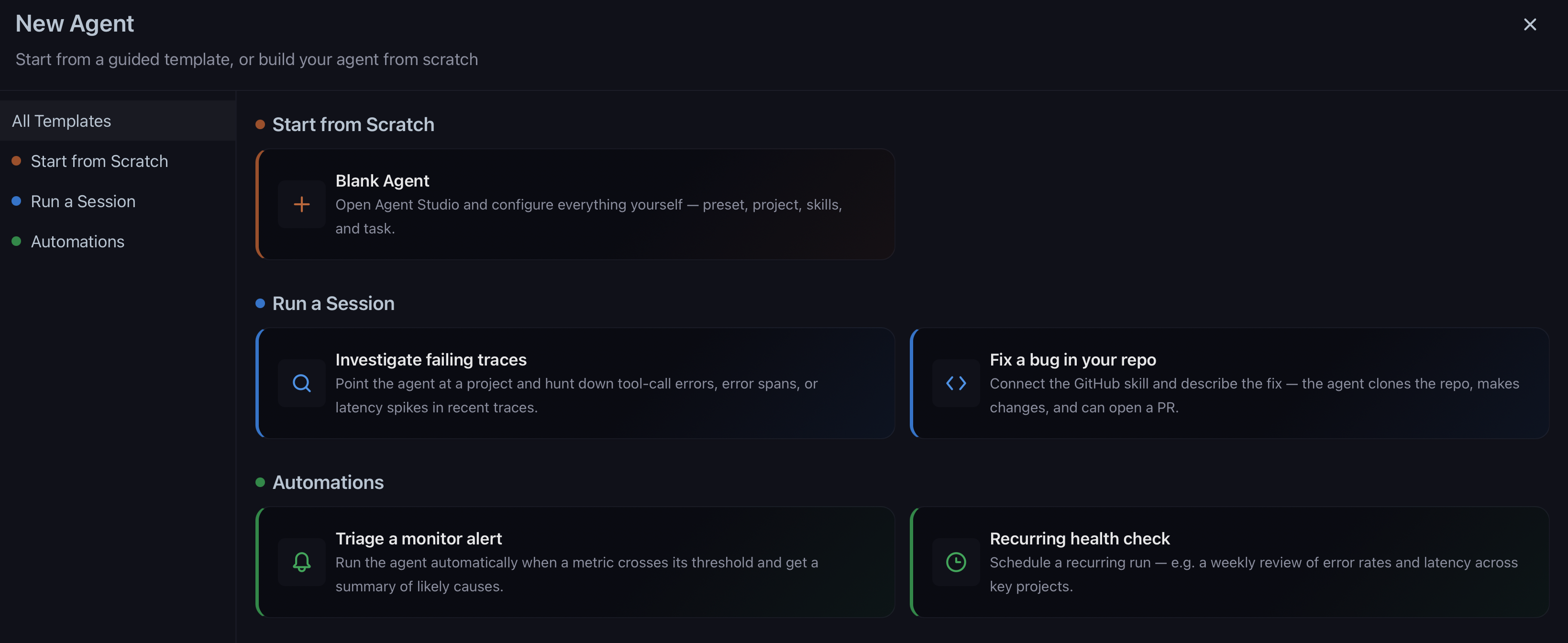
You land in the **agent gallery** first—pick a template or start from scratch—then configure the run in the Studio slide-over.
## Agent gallery
The gallery groups starting points by intent:
| Section | Use for |
| ---------------------- | ----------------------------------------------------------------------------- |
| **Start from Scratch** | Open Studio with an empty task—you choose preset, project, skills, and prompt |
| **Run a Session** | One-off investigations or repo fixes with a seeded prompt |
| **Automations** | Recurring health checks or metric-triggered triage |
Built-in session templates include **Investigate failing traces** and **Fix a bug in your repo**. Automation templates include **Triage a monitor alert** and **Recurring health check**. Each template pre-fills the task prompt and highlights the controls you should set next (project, preset, skills, or automation name).
 ## Session vs automation
| Mode | Use for |
| -------------- | ------------------------------------------------------------- |
| **Session** | One-off work; follow the transcript and send follow-ups |
| **Automation** | Repeating task on a **cron** schedule or **metric** threshold |
Sessions can run with a saved [agent preset](/ax/agents/agent-presets) or with **None** to configure harness, sandbox, and skills for that run only.
Automations **require a preset**—they inherit harness, sandbox, repo, and skills from it. Switch to automation mode with **Setup as automation** in the composer (available when an Arize sandbox preset is selected; Claude Managed Agent sessions are session-only).
[Signal](/ax/agents/get-started-with-signal) uses the same automation model on each LLM project.
## Configure a run
Choose a saved [agent preset](/ax/agents/agent-presets), or **None** to configure manually. Built-in Signal presets are not listed here—they are managed separately.
Traces and evals are read from this project for every run in the session or automation.
With **None** selected, add skills inline. With a preset, skills and repo come from the preset (edit the preset to change them).
Describe the investigation or output you need—for example, root-cause a tool failure or draft eval labels for faithfulness failures.
Click **Run session** for a one-off job, or **Setup as automation** → configure trigger and name → **Create Automation**.
On first run you may need to acknowledge that Claude Code can process project traces, your instructions, and connected repo or tool data.
## After you start
When a session starts, Studio closes and **Agent Swarms** opens the **Agent List** tab with the new run's detail slide-over. The worker provisions a sandbox, clones the repo (if configured), loads skills, and pulls project context.
From session detail you can:
* Read the live **transcript**
* Send **follow-ups** to steer the run
* **View traces** for the sandbox run
* **Reprovision** a completed or stopped session to continue work
Manage all runs from [Agent Swarms](/ax/agents/manage-agents).
## Outputs
| Output | When |
| ------------------------- | ---------------------------------------- |
| Investigation markdown | Always possible |
| Eval labels, dataset rows | Task-dependent |
| Branch / PR | Preset or run includes repo write access |
Review and merge PRs through your normal GitHub workflow.
## Related docs
These pages sit under **Managed Agents** in the docs sidebar:
* [Agent Presets](/ax/agents/agent-presets) — Save and manage harness, sandbox, repo, and skills
* [Agent Swarms](/ax/agents/manage-agents) — Swarm Manager and Agent List
* [How agents work](/ax/agents/how-agents-work) — Sandboxes, data access, credentials, and security boundaries
* [Skills and permissions](/ax/agents/skills-and-permissions) — Configure GitHub, Arize, Datadog, and custom skills; RBAC
## Session vs automation
| Mode | Use for |
| -------------- | ------------------------------------------------------------- |
| **Session** | One-off work; follow the transcript and send follow-ups |
| **Automation** | Repeating task on a **cron** schedule or **metric** threshold |
Sessions can run with a saved [agent preset](/ax/agents/agent-presets) or with **None** to configure harness, sandbox, and skills for that run only.
Automations **require a preset**—they inherit harness, sandbox, repo, and skills from it. Switch to automation mode with **Setup as automation** in the composer (available when an Arize sandbox preset is selected; Claude Managed Agent sessions are session-only).
[Signal](/ax/agents/get-started-with-signal) uses the same automation model on each LLM project.
## Configure a run
Choose a saved [agent preset](/ax/agents/agent-presets), or **None** to configure manually. Built-in Signal presets are not listed here—they are managed separately.
Traces and evals are read from this project for every run in the session or automation.
With **None** selected, add skills inline. With a preset, skills and repo come from the preset (edit the preset to change them).
Describe the investigation or output you need—for example, root-cause a tool failure or draft eval labels for faithfulness failures.
Click **Run session** for a one-off job, or **Setup as automation** → configure trigger and name → **Create Automation**.
On first run you may need to acknowledge that Claude Code can process project traces, your instructions, and connected repo or tool data.
## After you start
When a session starts, Studio closes and **Agent Swarms** opens the **Agent List** tab with the new run's detail slide-over. The worker provisions a sandbox, clones the repo (if configured), loads skills, and pulls project context.
From session detail you can:
* Read the live **transcript**
* Send **follow-ups** to steer the run
* **View traces** for the sandbox run
* **Reprovision** a completed or stopped session to continue work
Manage all runs from [Agent Swarms](/ax/agents/manage-agents).
## Outputs
| Output | When |
| ------------------------- | ---------------------------------------- |
| Investigation markdown | Always possible |
| Eval labels, dataset rows | Task-dependent |
| Branch / PR | Preset or run includes repo write access |
Review and merge PRs through your normal GitHub workflow.
## Related docs
These pages sit under **Managed Agents** in the docs sidebar:
* [Agent Presets](/ax/agents/agent-presets) — Save and manage harness, sandbox, repo, and skills
* [Agent Swarms](/ax/agents/manage-agents) — Swarm Manager and Agent List
* [How agents work](/ax/agents/how-agents-work) — Sandboxes, data access, credentials, and security boundaries
* [Skills and permissions](/ax/agents/skills-and-permissions) — Configure GitHub, Arize, Datadog, and custom skills; RBAC